Help us learn about your current experience with the documentation. Take the survey.
实例模板仓库
- Tier: Premium, Ultimate
- Offering: GitLab Self-Managed, GitLab Dedicated
在托管系统中,企业通常需要在团队之间共享自己的模板。 此功能允许管理员选择一个项目作为整个实例的文件模板集合。 然后,这些模板会通过 Web Editor 向所有用户开放,同时保持项目的安全性。
配置
要选择一个项目作为自定义模板仓库:
- 在左侧边栏底部,选择 管理员。
- 选择 设置 > 模板。
- 展开 模板
- 从下拉列表中,选择要用作模板仓库的项目。
- 选择 保存更改。
- 将自定义模板添加到所选仓库。
添加模板后,您可以在整个实例中使用它们。 它们可以在 Web Editor 和 API 设置 中使用。
这些模板不能用作 .gitlab-ci.yml 文件中
include:template 键的值。
支持的文件类型和位置
GitLab 支持用于议题和合并请求模板的 Markdown 文件以及其他文件类型的模板。
支持以下 Markdown 描述模板:
| 类型 | 目录 | 扩展名 |
|---|---|---|
| 议题 | .gitlab/issue_templates |
.md |
| 合并请求 | .gitlab/merge_request_templates |
.md |
更多信息,请参阅 描述模板。
其他支持的文件类型模板包括:
| 类型 | 目录 | 扩展名 |
|---|---|---|
Dockerfile |
Dockerfile |
.dockerfile |
.gitignore |
gitignore |
.gitignore |
.gitlab-ci.yml |
gitlab-ci |
.yml |
LICENSE |
LICENSE |
.txt |
每个模板必须位于其各自的子目录中,具有正确的扩展名,并且不能为空。目录结构应如下所示:
|-- README.md
    |-- issue_templates
        |-- feature_request.md
    |-- merge_request_templates
        |-- default.md
|-- Dockerfile
    |-- custom_dockerfile.dockerfile
    |-- another_dockerfile.dockerfile
|-- gitignore
    |-- custom_gitignore.gitignore
    |-- another_gitignore.gitignore
|-- gitlab-ci
    |-- custom_gitlab-ci.yml
    |-- another_gitlab-ci.yml
|-- LICENSE
    |-- custom_license.txt
    |-- another_license.txt
当通过 GitLab 界面添加新文件时,您的自定义模板会显示在下拉列表中:
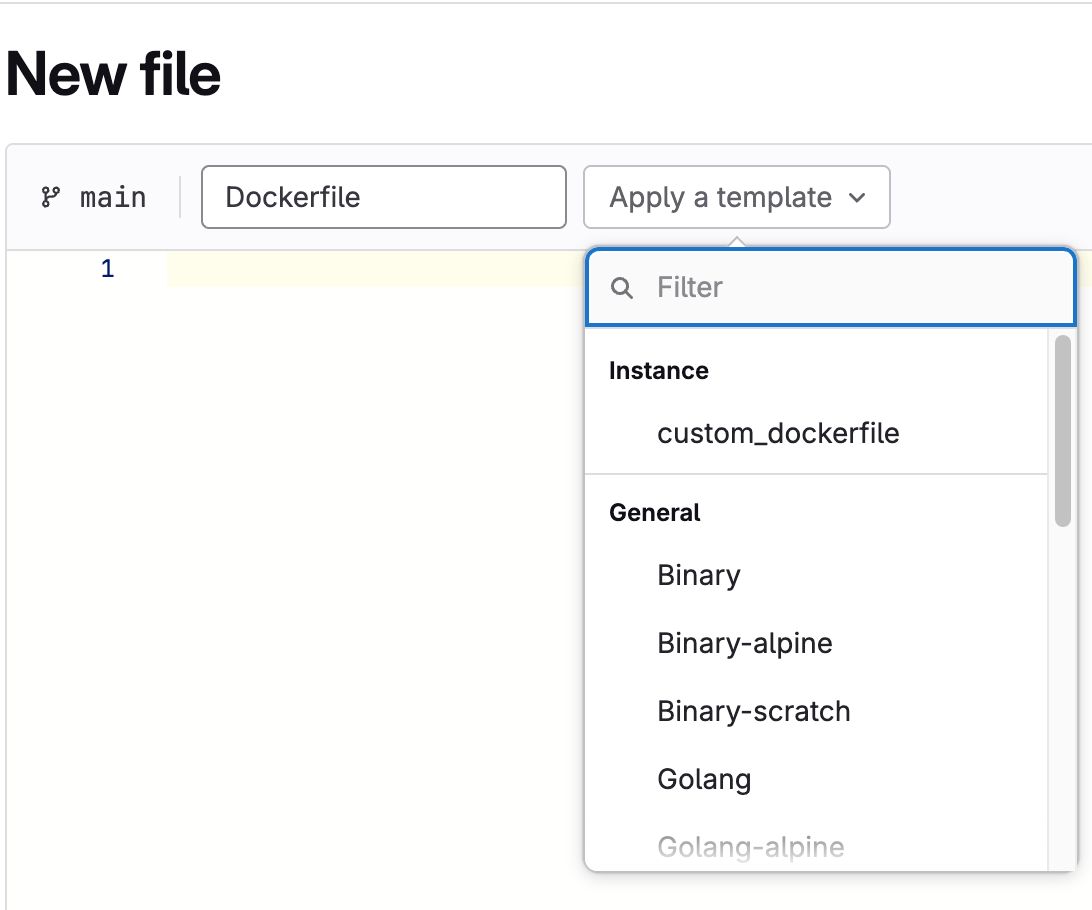
如果此功能被禁用或不存在任何模板, 则选择下拉列表中不会显示 自定义 部分。